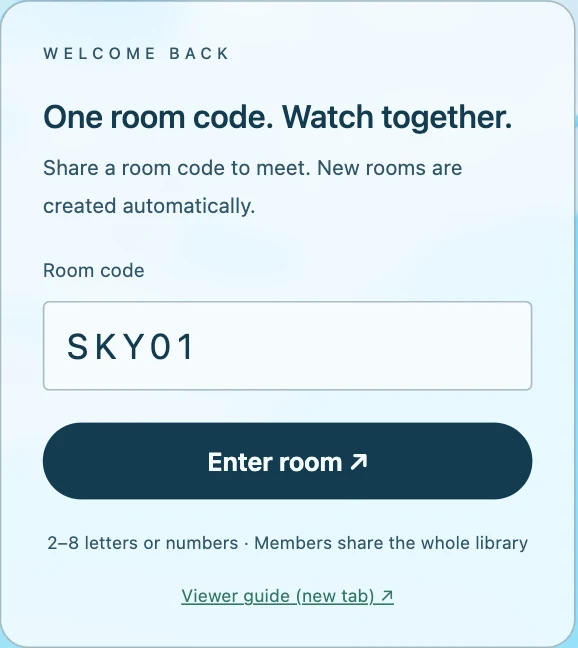
Open your friend's site. In the gallery, enter a room code of 2–8 letters or numbers and press “Enter room”. An unused code creates a room; the same code joins the same room.
Check the room code and online status, then press “Copy invite”. Privately send the complete link, including ?room=, to your friend. It opens that room directly. If the deployment has a site access password, ask the operator for it; this is not a third-party website credential.
The first viewer is usually the host. Look for “You are the host”; if needed, use “Members → Take playback control”. The host chooses the film, plays, pauses, seeks and changes synchronized speed. Other viewers follow.
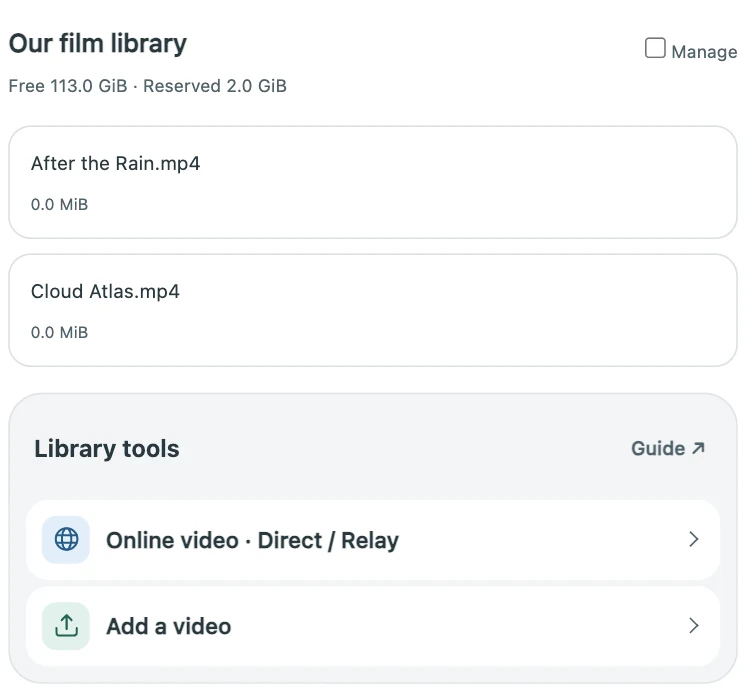
Use “Scroll to the screening”, then open “Library” in the sidebar. Choose a film using either example below. Clicking a library film or a candidate switches the source, initially paused; the host presses play to begin. If the browser blocks sound, each viewer should click the player's play button to enable it.
Check the title on both screens, then have the host pause and resume to confirm synchronization. Volume, subtitles, timed-comment visibility and “Viewing settings → Interface language” are local choices. They do not change your friend's language or translate titles, chat or subtitles.
The “Viewer guide” links in the gallery's room-entry card and the room's Library open a new tab, without reloading the player. Language links on this page only change this guide, not your saved room language. Share this page's URL with someone who has not joined yet. To keep watching, switch back to the original tab; there is no need to open the invitation again.
The host pauses any current film, opens “Library” and clicks an existing film. If it is empty, use “Add video” to upload a file you have permission to watch together. MP4 / M4V / WebM / MKV / AVI are supported; MKV and AVI appear after background processing completes. MP4 uploads are checked automatically: ordinary H.264 is kept unchanged; legacy video such as MPEG-4 Part 2 appears after conversion to H.264. HEVC and AV1 are kept as uploaded and require a compatible device. An upload never selects the film for the room. Check storage and processing status. Each viewer chooses from the available subtitle tracks in the player.
Library media is sent by this cinema to each viewer; viewers do not need access to a third-party origin. The library is shared across the site, not private to each room. Do not upload private or unauthorized content.
Prepare a video webpage or HTTPS media URL that you have permission to watch and share, such as a two-video page on your own site. This is not a single-video-site feature, and not every webpage can be discovered.
The host opens “Library → Online video · Direct / Relay” and pastes the URL. When ready to switch, pause the current film before clicking a candidate. Select a mode using the advice below, then press “Find videos”. The default option is relay; switch to direct first if everyone can reach the origin.
Wait for candidates, then explicitly click the candidate for the second video. Do not assume the first result is selected automatically. Static-page candidates may only be named “网页视频 1 / 2” (webpage video 1 / 2), rather than the page's titles. Confirm the order of media on the page and the picture. Only clicking a candidate replaces the current film or mode.
Check the second video's title, picture and mode label on both screens. Have the host play, pause and resume; both viewers should follow. To change mode, find videos from the same URL again and select the second candidate again. Changing the dropdown alone does not switch playback.
The selected source and playback state are synchronized, not the entire website or its interactions. Discovery failures or no results do not replace the current film. Do not click a different candidate just to troubleshoot.
Prefer this when everyone can fetch media from the original site. Media bytes travel directly from the origin to each browser; this cinema still handles discovery, selection and playback synchronization. The entry playlist for HLS still goes through this cinema, while media fragments go to the origin.
Origin CORS rules, browser codec support, temporary links and network reachability can prevent playback. One person being able to open the webpage does not mean every player's media requests will work.
Relay: the server fetches media
If a viewer cannot reach the origin directly but the server can lawfully fetch it, find the source again in relay mode. Browsers request /api/network/…/play from this cinema; the server fetches the origin and sends media separately to each viewer. That viewer need not contact the origin.
Relay is not a general webpage proxy, nor a promise to solve all codec or origin restrictions. If the server cannot fetch the source either, choose another authorized source.
Traffic: direct playback uses origin traffic and each viewer's own download bandwidth. Relay uses server upstream traffic, server egress to every viewer, and each viewer's download bandwidth. Sharing HLS fragments only reduces repeated origin fetches; it does not remove per-viewer server egress. The current default site-wide relay allowance is 5 GiB per 24 hours, with up to 6 concurrent media requests (not a guarantee for 6 viewers), subject to server bandwidth and deployment quotas. Relay does not permanently add videos to the library; sources can expire or be released.
To inspect the path, open your browser's Network developer tools. Direct MP4 requests go to the origin, as do direct HLS fragments. Relay media requests stay on this cinema's /api/network/…/play path. Do not publish signed source URLs, invitations or access credentials.
Try static-page media or a public HTTPS media URL first. Pages that only expose video after running scripts need the optional network discovery service. Ask the operator to check whether it is enabled with ./install.sh --network and running. Viewers can instead use an authorized direct media URL or upload their own file. No extension is required.
No playable media found
Check that the HTTPS address contains actual public media, not just a viewable webpage. Try an authorized direct media URL or upload your own file. Even dynamic discovery does not support every site. This cinema does not bypass login, CAPTCHA, paywalls or DRM.
A viewer sees a black screen, CORS or codec error in direct mode
Check origin reachability for every viewer and browser codec support. If the server can fetch it, find videos again in relay mode and select the same candidate. Otherwise choose compatible authorized media or upload your own file.
Source expired, released or its original URL stopped working
Find videos from the original page again and reselect the same video, or choose another authorized source. Discovery failures before selection keep the current film. If an already selected source is released, the room stops and clears the selection; the host must select again. It does not automatically choose another candidate.
Relay quota exhausted or too many concurrent requests
The allowance is shared by the whole site, not reserved per room. Wait for the 24-hour allowance window to reset or requests to finish; ask the operator to check the service. If everyone can reach the origin, find the source again in direct mode, or upload a file you have permission to use. The allowance can run out during playback: check the player error and reselect as above. The app does not automatically replace the film or fall back to direct.
Not synchronized or no sound
Check the room code, connection status and selected film on both screens. Use “Reconnect” after a disconnection. Ask the host to pause and resume; each viewer may need to press play to allow sound. Do not reload a playing page just to open help.
Use only content you have permission to watch and play together. Do not bypass access controls or submit third-party accounts, passwords, cookies or other credentials. Sources must be public HTTPS addresses without embedded usernames or passwords; loopback, private-network and special addresses are restricted. A room code is not a security password and does not isolate the shared library. Invite only trusted people, and keep private invitations out of public guides.
The host-selects, members-follow interaction was inspired by the VideoTogether guide (English) and original VideoTogether project. This is a self-hosted cinema, with no need for their extension. Their site compatibility, implementation and extension capabilities are not claims about this project.